Project case study
Zelohub — Healthcare Communication SaaS
A healthcare communication workspace connecting patient conversations, contact context, and day-to-day practice workflows.
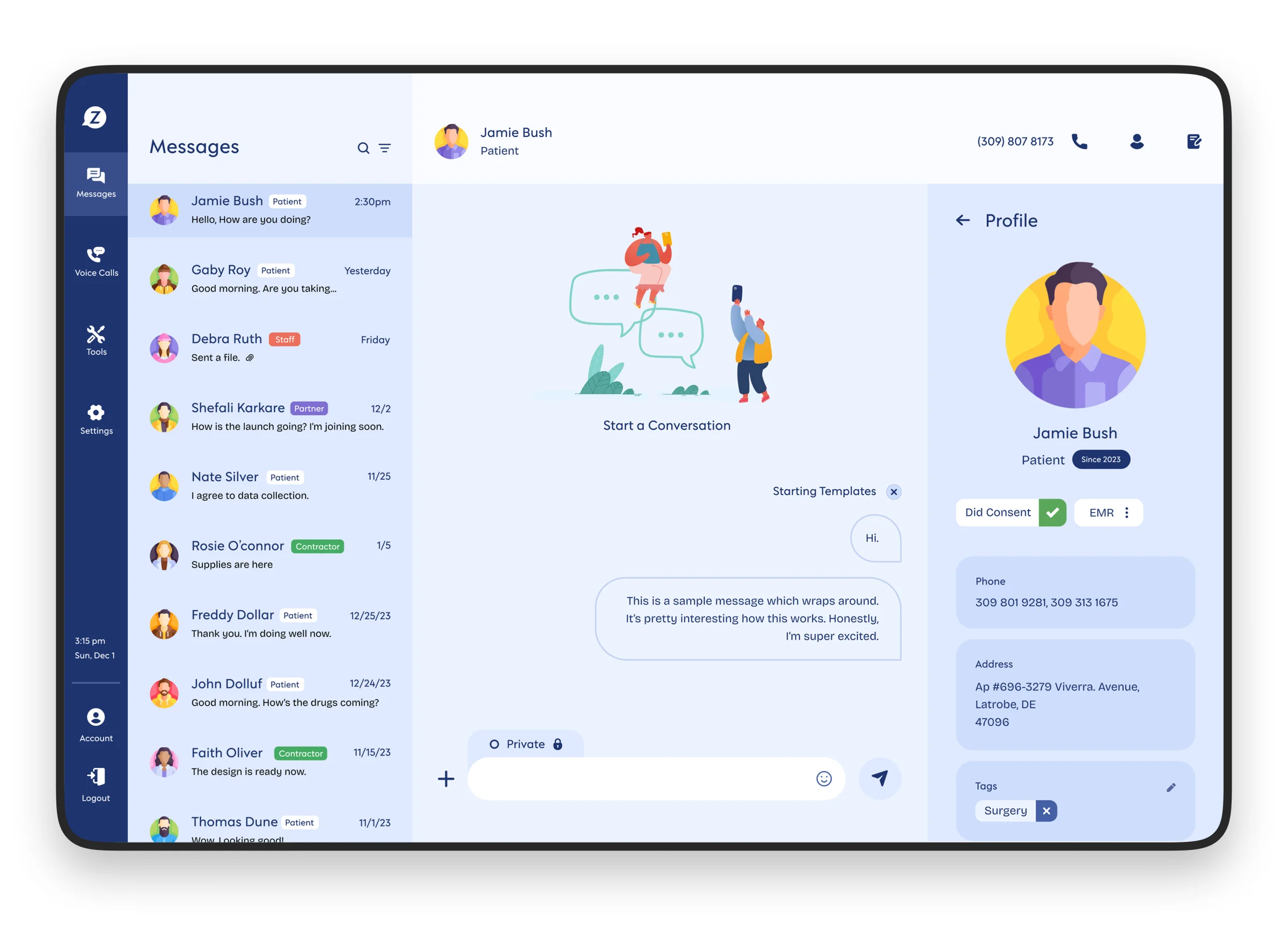
Zelohub brings communication and patient context into one application workspace. The product includes a public-facing website and application interfaces for messages, voice calls, tools, settings, and account management.
My focus was the connected product experience: moving from a conversation list into a patient-specific workspace while retaining the information needed to act. The interface is organized around application state and repeatable workflows, not isolated pages.
Conversation state and patient context
The messaging workspace combines a conversation list, an active conversation, and a patient profile. Each region has its own responsibility, but all three need to agree on the selected person and conversation.
That relationship is the central engineering concern: selecting a conversation changes the message context and the supporting profile together. Treating those as coordinated views of the same workflow helps avoid a screen that displays the right messages beside the wrong patient information.
Reusable application structure
Persistent navigation separates messages, voice calls, tools, settings, and account controls. Inside the workspace, conversation rows, contact information, tags, and message actions form recurring interface patterns.
These patterns provide clear component boundaries: application navigation, list items, workspace content, and contextual details. The technical value is a structure that can accommodate different communication tasks without duplicating the entire interface for each one.
Workflow boundaries and integration concerns
Patient context includes contact information, consent indicators, tags, and an EMR entry point. These controls describe different responsibilities: identifying the person, understanding their communication context, and moving into a related clinical workflow.
These workflows call for clear separation between the application UI and the services behind it. A conversation view handles selection and composition; a messaging service handles delivery; access to patient information requires server-side authorization. Keeping those responsibilities separate makes integration failures and permission constraints easier to represent in the interface.